 For Client Support:


 Blog Details
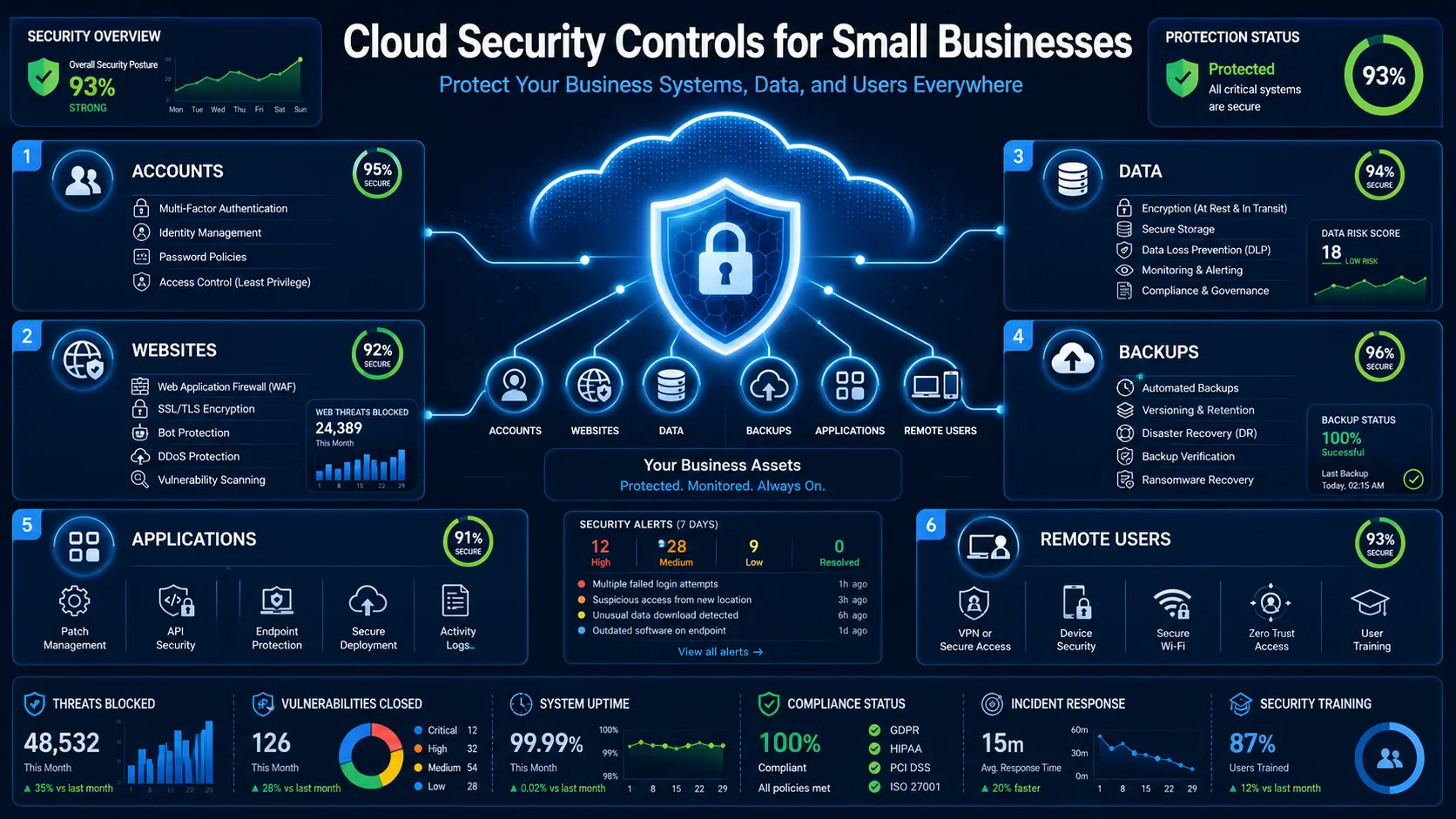

Cloud security for small businesses begins with a simple principle: every account, device, application, and data store should have a clear owner, limited access, current protection, and a recovery plan. Cloud providers secure their facilities and core platforms, but the business still controls users, passwords, permissions, data, configurations, and many application-level risks.
Small companies do not need an enterprise-sized security department to make meaningful improvements. They need a prioritized set of controls that reduce the most likely and damaging risks.
1. Turn On Multi-Factor Authentication
Multi-factor authentication adds another verification step beyond a password. Enable it first for email, cloud administration, website hosting, domain registration, payment systems, password managers, source-code repositories, and accounting tools. Administrator accounts should never rely on passwords alone.
2. Use Separate Accounts and Least Privilege
Employees should have individual accounts instead of shared logins. Give each person only the access needed for current responsibilities, and review that access when roles change. Administrator privileges should be used only for administrative work—not everyday email and browsing.
3. Protect the Root or Owner Account
Major cloud platforms often have a highest-level owner or root account. Protect it with a unique password, multi-factor authentication, secure recovery details, and limited use. Create named administrator roles for normal management activity so important actions can be traced.
4. Keep Systems and Applications Updated
Cloud infrastructure does not automatically fix outdated website code, plugins, operating systems, libraries, or custom applications. Create an update schedule, remove unsupported software, test important changes, and maintain a rollback option.
5. Encrypt Sensitive Data
Use HTTPS for websites and applications. Enable encryption for supported databases, storage, backups, and devices. Encryption reduces exposure, but it does not replace access control. A user with excessive permission may still read encrypted data through the application.
6. Build Backups for Recovery, Not Just Storage
Maintain more than one protected copy of critical data. Separate backup access from normal user access, define how much data loss the business can tolerate, and test restoration. Include websites, databases, cloud files, application settings, and configuration documentation.
7. Centralize Logging and Alerts
Logs can reveal repeated login failures, permission changes, unusual downloads, application errors, and unexpected infrastructure activity. Start with alerts for high-risk events rather than collecting large amounts of data nobody reviews.
8. Secure Websites and Public Applications
Public websites should use HTTPS, secure forms, server-side validation, prepared database queries, safe file uploads, restricted administration, and dependable hosting. Protect secrets such as API keys and database credentials in environment configuration rather than public source files.
Cloud Technology Computing provides cloud security services and cloud data security planning for websites, databases, infrastructure, backups, and business workflows.
9. Review Third-Party Applications
Every connected application can introduce new permissions and data exposure. Keep an inventory of software-as-a-service tools, integrations, browser extensions, and vendor accounts. Remove applications that are no longer used and limit the data each integration can access.
10. Create an Employee Offboarding Checklist
When an employee or contractor leaves, disable accounts quickly, revoke active sessions, rotate shared credentials, recover devices, remove API keys, redirect business email, and confirm that company data has been returned. Offboarding should be a documented process, not an improvised task.
11. Prepare an Incident Response Plan
Write down who makes decisions, who contacts customers and vendors, how systems are isolated, where backups are located, and which legal or insurance contacts may be needed. During an incident, clear roles are more valuable than a complicated document nobody can follow.
12. Train Employees With Real Examples
Security awareness should cover phishing, unexpected multi-factor prompts, payment-change requests, password reuse, public Wi-Fi, sensitive data handling, and how to report a suspected problem. Short, repeated training is usually more useful than one annual presentation.
A 30-Day Cloud Security Checklist
- Week 1: inventory administrator accounts, turn on multi-factor authentication, and remove former users.
- Week 2: review backups, perform a restoration test, and protect recovery credentials.
- Week 3: patch websites, servers, devices, and business applications; remove unsupported tools.
- Week 4: configure high-priority alerts, document incident contacts, and schedule the next access review.
Common Cloud Security Mistakes
- Assuming the cloud provider secures every customer configuration.
- Using one administrator account for the entire team.
- Leaving storage, databases, or development tools publicly accessible.
- Keeping backups in the same account with the same permissions as production data.
- Ignoring website forms, plugins, API keys, and custom code.
- Collecting sensitive customer information that the business does not need.
- Waiting for an incident before documenting systems and responsibilities.
Frequently Asked Questions
Is cloud computing safer than local servers?
Cloud platforms can provide strong security capabilities, but safety depends on configuration, identity, updates, applications, monitoring, and recovery. A poorly configured cloud account can still create serious risk.
What should a small business secure first?
Begin with email, administrator accounts, domain and hosting access, payment systems, backups, and any system containing customer or employee data.
How often should access be reviewed?
Review access whenever a role changes and on a recurring schedule. High-risk administrator and financial accounts should be checked more frequently than low-risk systems.
Strengthen Your Cloud Security
Cloud Technology Computing can review your cloud accounts, website, database, backups, access controls, and managed IT processes to create a prioritized security plan.
Book a free consultation with Cloud Technology Computing to discuss your goals, current systems, and next best step.
0 Comments