 For Client Support:


 Blog Details
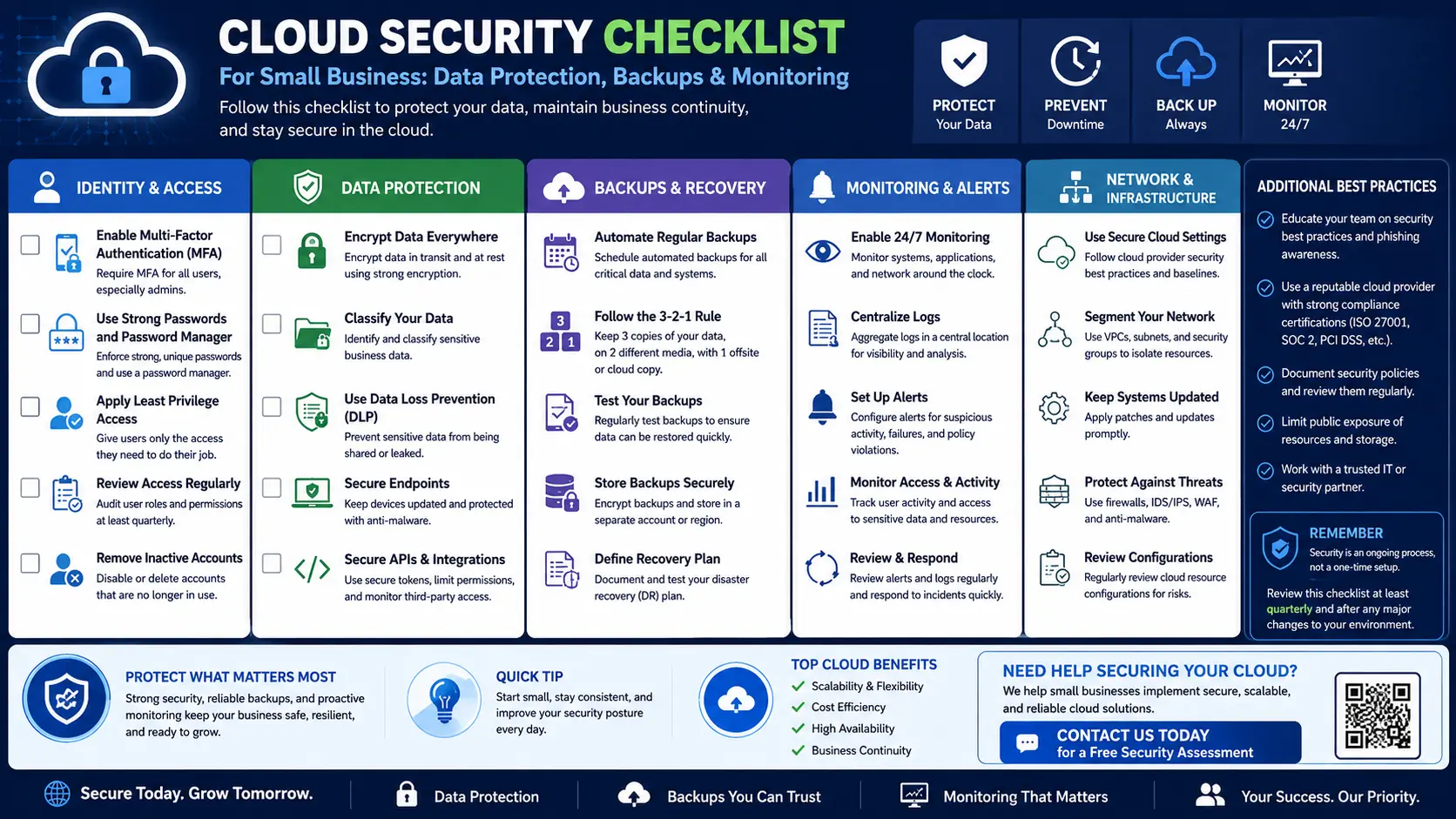

Cloud Security Checklist for Small Businesses: Protect Data Without Enterprise Costs
Small businesses are not too small to care about security. If your website collects forms, stores customer information, accepts payments, uses email, or depends on cloud tools, you need a practical security foundation.
Cloud security does not need to be complicated, but it does need to be intentional. Use this checklist to reduce risk and protect your business.
1. Use HTTPS everywhere
Every business website should use HTTPS. It protects data in transit and helps visitors trust your site. Make sure your SSL certificate is active and that HTTP traffic redirects to HTTPS.
2. Create strong access controls
Limit administrator access. Use strong passwords, multi-factor authentication where available, and separate accounts for different users. Do not share one admin login across your entire business.
3. Back up your website and database
Backups are one of the most important security controls. Back up files and databases automatically. Store backups securely and test restoration so you know they work before an emergency.
4. Keep software updated
Outdated software creates risk. Keep PHP, CMS tools, plugins, frameworks, libraries, server packages, and scripts updated. Remove features you no longer use.
5. Protect contact forms and lead forms
Forms should validate input, use spam protection, avoid exposing sensitive errors, and store only the information you need. If you collect leads, protect that database.
6. Monitor uptime and suspicious activity
Monitoring helps you respond faster. Track uptime, errors, failed logins, traffic spikes, unusual referrers, and performance changes. Security is easier when you see problems early.
7. Use least privilege
Give users only the access they need. A contractor updating website images should not necessarily have full database or hosting access. Least privilege reduces damage from mistakes or compromised accounts.
8. Secure cloud storage
Cloud storage is convenient, but permissions matter. Review who can view, edit, download, or share business files. Avoid public access unless the file is intentionally public.
9. Create an incident response plan
Write down what to do if something goes wrong. Include who to contact, how to restore backups, how to reset passwords, how to notify affected users if needed, and how to document the issue.
10. Get help before the risk grows
Security becomes harder as your business adds more tools, users, payments, websites, and data. A cloud security review can identify quick fixes before they become expensive problems.
Final takeaway
Small business cloud security is about practical protection: HTTPS, backups, access control, updates, monitoring, and clear recovery steps. You do not need enterprise complexity to build a safer foundation.
Need a Cloud Security Review?
Cloud Technology Computing helps small businesses improve cloud security, backups, monitoring, website protection, and managed IT support.
Click here to explore cloud security services or request a free consultation.
0 Comments