 For Client Support:


 Blog Details
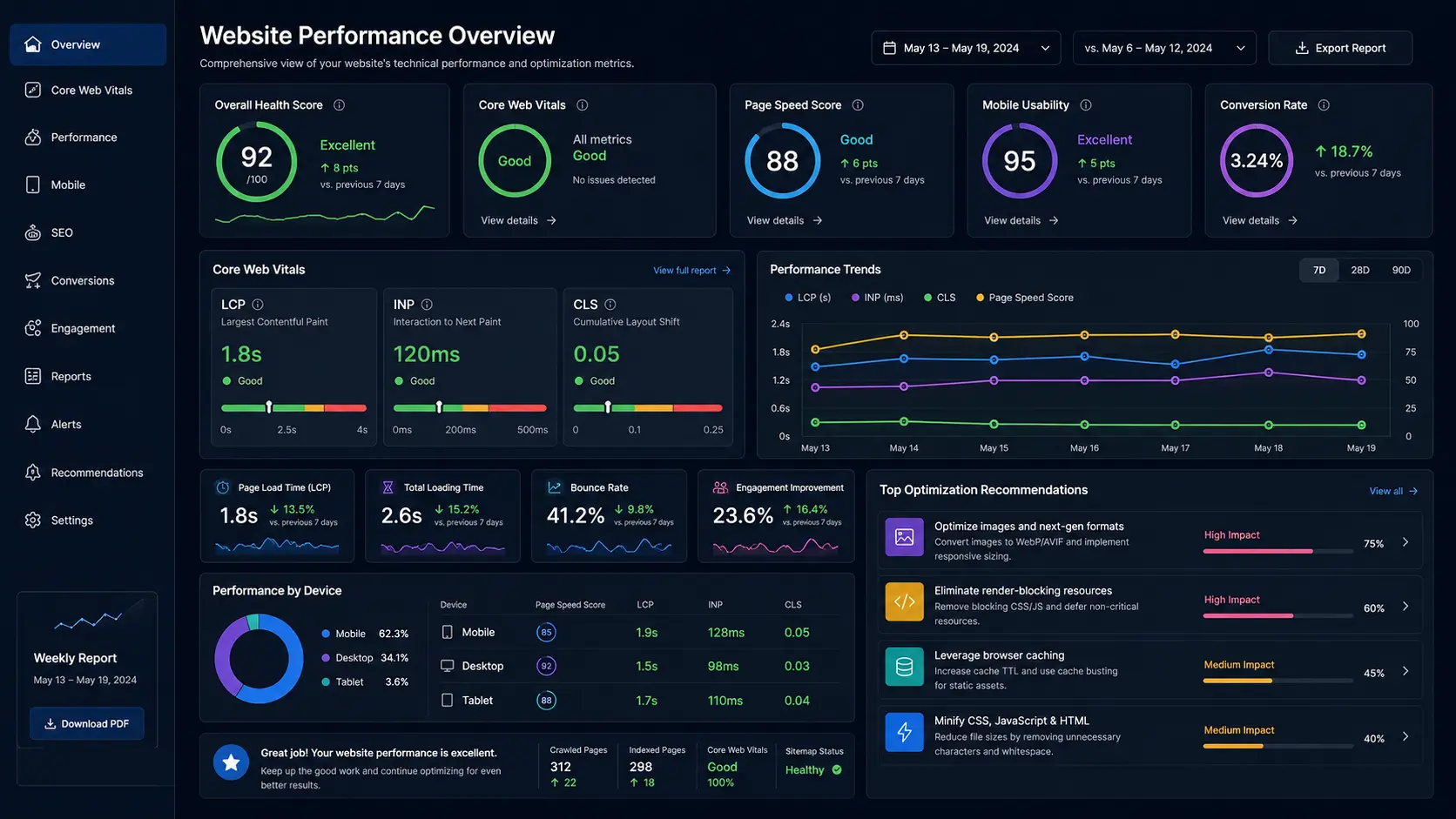

Core Web Vitals and website speed affect how quickly visitors can see, use, and trust a business website. A slow page can make advertising less effective, reduce form completions, frustrate mobile users, and create a poor first impression before a visitor reads the offer.
Google’s Core Web Vitals focus on loading, interaction responsiveness, and visual stability. The current metrics are Largest Contentful Paint (LCP), Interaction to Next Paint (INP), and Cumulative Layout Shift (CLS). Google recommends aiming for LCP within 2.5 seconds, INP within 200 milliseconds, and CLS at or below 0.1 for a strong experience at the 75th percentile. See the official Web Vitals guidance for definitions and measurement details.
Understand the Three Core Web Vitals
Largest Contentful Paint
LCP measures how long it takes the main visible content—often a hero image, headline block, or large section—to appear. Slow servers, oversized images, render-blocking CSS, and delayed fonts can make LCP worse.
Interaction to Next Paint
INP measures responsiveness across user interactions. Heavy JavaScript, long main-thread tasks, third-party widgets, and inefficient event handlers can make clicks and taps feel delayed.
Cumulative Layout Shift
CLS measures unexpected movement while the page loads. Images without dimensions, late-loading banners, injected forms, ads, and font changes can cause buttons and text to shift.
Measure Before You Optimize
Use multiple data sources. PageSpeed Insights and Lighthouse provide lab diagnostics. Google Search Console reports field data from real users when enough information is available. Browser developer tools can reveal network requests, long tasks, unused code, image sizes, and layout shifts.
Test the homepage, top service pages, blog articles, contact page, and any paid-ad landing pages. A fast homepage does not guarantee that a database-driven blog or form page performs well.
1. Optimize Images First
- Convert large photographs to WebP or AVIF when supported by the workflow.
- Resize images to the dimensions actually displayed instead of uploading full-resolution originals.
- Compress images while checking visual quality.
- Add width and height attributes to reduce layout shift.
- Preload only the critical above-the-fold image; lazy-load images farther down the page.
- Use descriptive filenames and ALT text for accessibility and image search context.
2. Reduce Render-Blocking CSS and JavaScript
Load only the CSS and JavaScript needed for the page. Remove abandoned libraries, duplicate frameworks, and plugins that add large bundles for small features. Defer noncritical scripts and move expensive work away from the first interaction.
Third-party chat, analytics, review, advertising, and payment scripts may be necessary, but each should earn its cost. Delay nonessential widgets until the main page is usable or the visitor shows intent.
3. Improve Server and Database Response
A browser cannot render content that the server has not delivered. Slow database queries, missing indexes, repeated queries, external API calls, and overloaded hosting can delay every page asset. Cache repeatable output, add appropriate database indexes, reduce unnecessary queries, and monitor server response time.
Cloud Technology Computing offers website optimization services and managed cloud hosting for business websites, databases, and applications.
4. Configure Browser and Server Caching
Static assets such as images, CSS, JavaScript, and fonts should use long cache lifetimes when filenames change after updates. Dynamic HTML may use shorter caching or application-level strategies. Compression such as Brotli or Gzip can reduce transfer size for text resources.
5. Control Fonts
Each font family and weight creates another request and can delay text rendering. Use fewer weights, preload only the critical font file, host fonts efficiently, and choose a font-display strategy that keeps text visible during loading.
6. Prevent Layout Shift
- Reserve space for images, videos, embedded forms, and banners.
- Do not insert large promotional blocks above content after the page begins loading.
- Use stable button and navigation dimensions.
- Test cookie notices, chat widgets, and mobile menus on narrow screens.
- Load replacement fonts in a way that minimizes dramatic size changes.
7. Optimize for Mobile First
Many performance problems are more visible on slower mobile devices and networks. Keep navigation simple, make tap targets comfortable, reduce oversized animations, avoid horizontal scrolling, and make the primary call to action easy to reach.
8. Fix the Pages That Produce Revenue
Do not optimize only the score. Start with pages that attract search traffic, receive advertising clicks, explain core services, collect leads, or process payments. Measure whether speed improvements increase engagement, form completion, and sales—not only whether a test number changes.
A Practical Optimization Order
- Back up the site and record baseline measurements.
- Compress and resize the largest above-the-fold images.
- Remove or delay unnecessary third-party scripts.
- Fix slow server and database work.
- Reduce unused CSS and JavaScript.
- Add caching, compression, and stable image dimensions.
- Retest on mobile and monitor field data after deployment.
Frequently Asked Questions
Does a perfect PageSpeed score guarantee higher rankings?
No. Relevance, quality, intent, links, usability, and many other signals matter. Performance is still important because it improves the experience and can support search success when competing pages are similarly useful.
Why is the mobile score lower than desktop?
Mobile testing usually simulates slower devices and networks. Large scripts, images, and layout work become more expensive under those conditions.
How often should performance be tested?
Test after major design, plugin, hosting, code, analytics, or content changes. Also monitor important pages regularly because third-party scripts and content growth can gradually reduce performance.
Make Your Website Faster
Cloud Technology Computing can audit page speed, Core Web Vitals, hosting, images, PHP, MySQL, JavaScript, and mobile usability, then prioritize fixes by business impact.
Book a free consultation with Cloud Technology Computing to discuss your goals, current systems, and next best step.
0 Comments